I noticed the report of a critical bug in the service pack 5 release for max 2014 at one of the Autodesk Blogs (can't remember which one at the moment). It regards Backburner (of course) and some confusion between render nodes, the backburner manager and the submitting workstation. Apparently the update fails to install the correct Environment Variable (System) so that the computers understand whether you are rendering with 3ds Max or 3ds Max Design. The solution was posted here:
Backburner Environment variable fix
Backburner 2015 can be downloaded from the Autodesk Exchange here:
backburner 2015

Wednesday, May 7, 2014


3ds Max 2015 Updates and Downloads
3ds Max 2015 updates and downloads can be found here:
3ds max downloads page
This includes Service Pack 1 (already) and sample files as well as the latest updates for Max 2014 (SP5)
If you have 2015 installed, you have probably already gotten the notification of the SP1 update from the Autodesk Application Manager (running in the system tray by default).
New DAS Maxscripts Available!
There are several new maxscripts at the DAS web site. Check 'em out!. These include a new version of the "Time Bandit" script for quick and precise control of the max Time Slider. This new version allows you to save preset time ranges and recall them at any time later. They are saved with the max scene. A great feature suggested by my colleague Jason Brummett.

Also you'll find a unique MaxScript called "Bisector" written as a request from Derek Townshend, a Max user on scriptspot. Bisector is a custom, scripted controller embedded in the Max LookAt Constraint that forces a source object to always split the angle between 2 look at targets. The default LookAt Constraint actually doesn't do this, but rather forces the source node to look at the "midpoint" between the 2 targets. As Derek pointed out to me, that midpoint changes when the 2 targets are different distances from the source. Take a look at the sample below to see the difference:
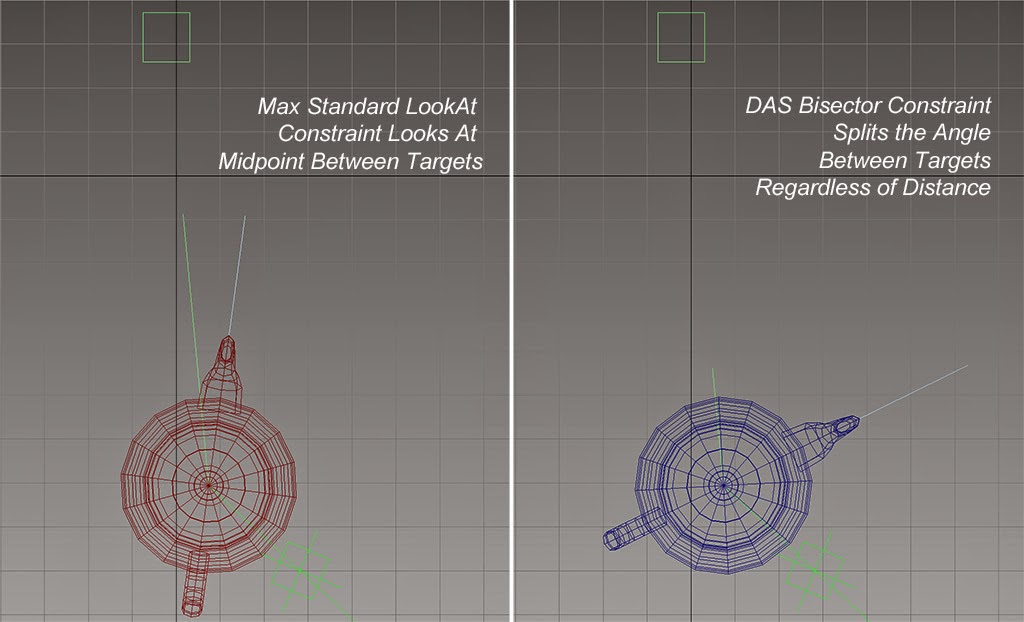
An interesting MaxScript challenge and functionality that should really be part of the LookAt Constraint to begin with.
MotionBuilder 2015 & Kinect
I noticed that one of the important updates to MotionBuilder 2015 is support for Microsoft Kinect data import onto Actors. Being involved with motion capture, this will be something to look into in more detail.
Wednesday, April 9, 2014
3ds max 2015 Help Files available online
The Autodesk 3ds Max 2015 Help files are available online now at:
http://help.autodesk.com/view/3DSMAX/2015/ENU/
Thanks to Mark Kauffman for posting the link at the Autodesk Entertainment User Group of Denver linked in page.
Sunday, February 23, 2014
Dynamic Reflections with Nitrous
The ability to see dynamic, real-time reflections in the viewport has been in Nitrous for a while but not exposed to the user interface. A simple maxscript can enable this feature. I have uploaded a pair of macros to enable or disable it You'll find them on the "Maxscripts" page of the DAS web site. Just copy the 2 macros to your Macroscripts folder (wherever that may be), restart Max and follow the instructions for activating and using the macros as described in the screen capture images in the zip download. A sample of the dynamic reflections in use is included and shown below. This is just a quick feature enhancement to the viewports. More powerful scripts are out there to help wrangle Nitrous to your liking.

Sunday, February 2, 2014
Backburner running as service
If you're using Autodesk Backburner to control your network rendering and you have backburner set up to run as a service across your network, you've probably noted in Windows 7 that if you're using a local domain for your network, you need to use a login account for the service that has top level domain privileges. Otherwise, the service will have trouble talking to the manager.
What you may not have known is exactly which account 3ds max is using when it starts as a render service. You might have thought it was the login credentials you used to authorize the service or perhaps even the current user, but you'd be wrong. Backburner is using the account of the user who installed the software. Now if you have a well organized studio or even a small one of your own in which all this has been taken care of by a single individual, this probably hasn't been a problem. But when backburner rears its head and the log starts telling you about missing configurations this is a real difficult problem to nail down, especially with plugins, startup variables or map paths to network locations.
Happy Rendering! (OK, with backburner that's probably a lot to wish for...)
Subscribe to:
Posts (Atom)